Make sure this part fits

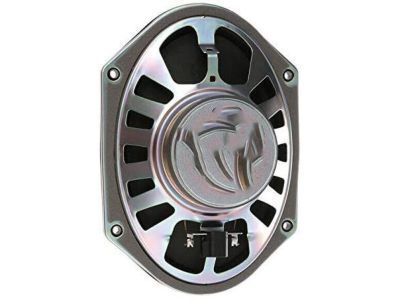
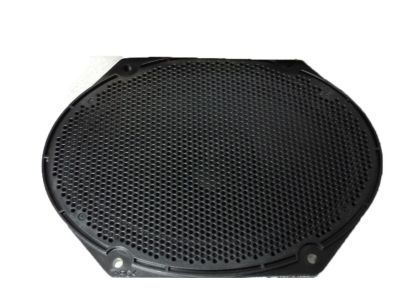
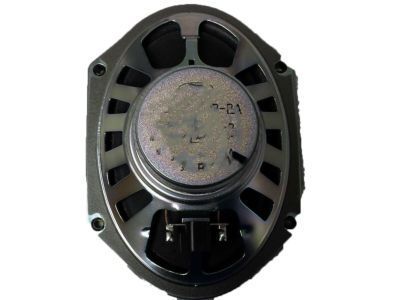
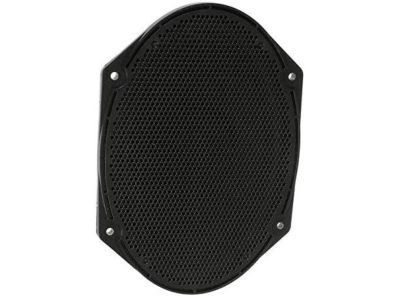
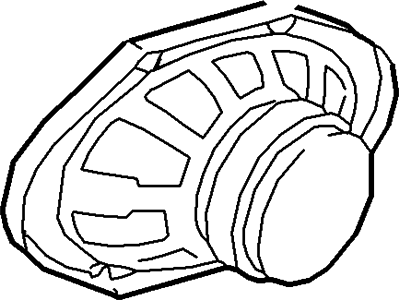
Mercury 7U5Z-18808-B Speaker Assembly

2005-2011 Mercury 7U5Z18808B

Customer Questions & Expert Answers (7)
7U5Z-18808-B Ford Speaker Assembly Product Photo 1 of 4
  • Part Description
    Speaker Assy
  • Base No.
    18808
  • Position
    Passenger Side/Driver Side
  • Replaces
    6U5Z-18808-DA, 6U5Z-18808-BA
  • Manufacturer
    Ford
Make sure this part fits
$22.71 MSRP: $32.35
You Save: $9.64 (30%)
Ships in 1-3 Business Days
1
ADD TO CART
  • Related Parts
  • Specifications
  • Fitment
  • Q&A
  • Product Specifications

    BrandGenuine Mercury
    Base No.18808
    Manufacturer Part Number7U5Z-18808-B, 7U5Z18808B
    Part DescriptionSpeaker Assy
    Item Dimensions8.7 x 7.2 x 3.6 inches
    Item Weight1.80 Pounds
    PositionPassenger Side/Driver Side
    ConditionNew
    Fitment TypeDirect Replacement
    Replaces6U5Z-18808-DA, 6U5Z-18808-BA
    ManufacturerFord
    SKU7U5Z-18808-B
    WarrantyThis genuine Ford part is guaranteed by Ford's factory warranty.
    Shipping & ReturnShipping Policy Return Policy
    Warning: California's Proposition 65
  • Vehicle Fitment

    Year Make Model Engine Important vehicle option details
    2007-2011 Mercury Grand Marquis8 Cyl 4.6L Romeo SOHC EFI4-Speed Automatic Transmission 4R75E Livonia, Left Hand Drive, Rear-Wheel Drive (Left Hand Drive)
    2005-2011 Mercury Mariner4 Cyl 2.3L, 4 Cyl 2.3L Hybrid Gas/Electric DOHC, 4 Cyl 2.5L Duratec (110kW/150PS), 4 Cyl 2.5L PFI Gas/Electric, 6 Cyl 3.0L DOHC EFI Modular, 6 Cyl 3.0L OHC Duratec4AT CD4E, 5-Speed Manual Transmission, 5-Speed Manual Transmission - AK, 6-Speed Automatic Transmission 6F Mid-Range, CVT Auto Trans Powersplit Elec, Four-Wheel Drive (Full Time) (Left Hand Drive), Front-Wheel Drive (Left Hand Drive), Left Hand Drive, Two-Wheel Drive (Left Hand Drive)
  • Customer Questions & Expert Answers

    Q:
    Does the PN fit my vehicle? Posted by FordPartsGiant Specialist
    A:
    You can Select Your Vehicle to check if 7U5Z-18808-B fits your vehicle.
    Posted by FordPartsGiant Specialist
    Q:
    How to disconnect and remove the front and rear car speakers on Ford Crown Victoria? Posted by Customer
    A:
    Disconnect the cable from the negative battery terminal. For 1991 and earlier models, remove the screws and detach the bezel, then take out the mounting screws. Slide the radio/CD unit out, support it, disconnect the ground cable, antenna, and electrical connectors, and remove the assembly from the instrument panel, with installation being the reverse of removal. For 1992 and later models, the radio receiver and CD player assemblies are secured by special clips that require radio removal tools or U-shaped coathanger wire to release. Insert the tools into the holes at the corners of the assembly until the internal clips release, then flex out on both tools while pulling the assembly out, disconnecting the antenna and electrical connectors before removing the unit from the vehicle. To install, plug in the electrical connectors, slide the radio or CD player into the instrument panel until the clips snap in place. For door-mounted speakers, remove the door trim panel, take out the mounting screws, withdraw the speaker, unplug the electrical connector, and remove the speaker from the vehicle, with installation being the reverse of removal. For rear quarter panel mounted speakers, remove the screws and pry off the speaker grille, then take out the retaining screws, withdraw the speaker, unplug the electrical connector, and remove the speaker from the vehicle, with installation being the reverse of removal. For package shelf mounted speakers, open the trunk lid, work under the package tray to unplug the electrical connector, remove the retaining screws/nuts or detach the clips, then lower the speaker and remove it from the vehicle, with installation being the reverse of removal.

    Posted by FordPartsGiant Specialist
    Q:
    How to remove and install car speakers, including door speakers, rear quarter speakers, and a trunk-mounted subwoofer speaker on Ford Focus? Posted by Customer
    A:
    To change the door speakers begin by taking off the door trim panel and then removing the four cross-head screws which pulls the speaker from inner panel for the rear speaker of the 3-door model. To remove it, loosen the screw on the bottom and pull off the electrical connector followed by the speaker and reverse the above in case of re-installation. For rear quarter speakers in two-door models, there is a C-pillar trim panel bolt cover that has to be unbolted followed by unbolted of the C-pillar trim panel and then pulled inwards. In case the retention clips became stuck, take them out and place into C-pillar trim panel then they must be reinstalled. Pull and take out the door threshold scuff panel and deal with any clips, if necessary, in the same way. Free the door weather strip, get rid of the lower hinges and child seat anchorages, plus rear seat backrests, as well as get rid of the bezel from the seat belt sender. Removing the quarter trim panel requires pulling it away from its clips, after which the speaker connectors are unscrewed and disconnected, the trim panel is fastened in reverse to the initial process. For four-door models, first, disconnect the trim cover at the D-panel screw and also the screw freeing the D-pillar trim panel. In the trunk, to unlock the seat side bolster upper retainer, further take out the rear seat cushion and the rear seat side bolster panel lower nut in order not twisting seat belt in the process of reinstallment. Disconnect and unbolt the lower seat belt; free the door weatherstripping; unfasten, but do not take out, the screw cover and screw for the upper and lower quarter trims, as well as the upper and lower quarter trims themselves. Treat any jammed clips as described above then undo the screws and the quarter panel speaker and disconnect the wiring before finally tightening the screws and putting back the quarter panel speaker in its proper place. For the subwoofer trunk-mounted speaker the point one should remember is that the whole speaker, amplifier and enclosure must be changed simultaneously. First Pop the left trunk trim panel, next disconnect the wires from the subwoofer, then un bolt the four screws to remove the subwoofer assembly and at last, install it in the reverse manner.
    Posted by FordPartsGiant Specialist
    Q:
    How to disconnect and remove the front and rear car speakers on Mercury Grand Marquis? Posted by Customer
    A:
    Disconnect the cable from the negative battery terminal. For 1991 and earlier models, remove the screws and detach the bezel, then take out the mounting screws. Slide the radio/CD unit out, support it, disconnect the ground cable, antenna, and electrical connectors, and remove the assembly from the instrument panel, with installation being the reverse of removal. For 1992 and later models, the radio receiver and CD player assemblies are secured by special clips that require radio removal tools or U-shaped coathanger wire to release. Insert the tools into the holes at the corners of the assembly until the internal clips release, then flex out on both tools while pulling the assembly out, disconnecting the antenna and electrical connectors before removing the unit from the vehicle. To install, plug in the electrical connectors, slide the radio or CD player into the instrument panel until the clips snap in place. For door-mounted speakers, remove the door trim panel, take out the mounting screws, withdraw the speaker, unplug the electrical connector, and remove the speaker from the vehicle, with installation being the reverse of removal. For rear quarter panel mounted speakers, remove the screws and pry off the speaker grille, then take out the retaining screws, withdraw the speaker, unplug the electrical connector, and remove the speaker from the vehicle, with installation being the reverse of removal. For package shelf mounted speakers, open the trunk lid, work under the package tray to unplug the electrical connector, remove the retaining screws/nuts or detach the clips, then lower the speaker and remove it from the vehicle, with installation being the reverse of removal.

    Posted by FordPartsGiant Specialist
    Q:
    How do you remove the radio from the 2012 Ford Escape? Posted by Customer
    A:
    First, remove the center middle instrument panel trim panel. Then, remove the four audio unit mounting screws and separate the unit from the trim panel. Disconnect the antenna and other wiring if there's a navigation system. Side brackets can be removed if necessary.
    Posted by FordPartsGiant Specialist
    See expert answers on similar Car Speakers
    Q:
    What is the first step to remove the front door speakers for the 2007 Ford F-150? Posted by Customer
    A:
    Remove the front door trim panel.
    Posted by FordPartsGiant Specialist
    See expert answers on similar Car Speakers
    Q:
    How do you reinstall the radio in the 2008 Mercury Mariner? Posted by Customer
    A:
    Reinstall following the reverse order of removal. Make sure to reconnect the antenna and other wiring if disconnected. Reinstall any side brackets if necessary.
    Posted by FordPartsGiant Specialist
    See expert answers on similar Car Speakers
    If you have any questions about this product, please don't hesitate to ask us. We will be happy to help you!

Genuine Ford Part 7U5Z-18808-B, the Right Choice

To ensure reliability, purchase part # 7U5Z-18808-B Speaker Assembly. It is also called Car Speakers. OEM parts are of high quality and known for their longevity. This is because they are built to the Ford standards which are relatively high and undergo rigorous quality control testing. This part fits specific Mercury Grand Marquis, Mariner models.

FordPartsGiant.com is a leading supplier of genuine components and accessories such as 7U5Z18808B Speaker Assembly. Looking to purchase quality low-cost OEM Ford parts? You have just found the right place. For detailed Mercury parts information, click here.

Why choose Ford Parts Giant

  • Dedicated Service

    Your complete satisfaction is our #1 goal

  • Lowest Prices

    Best deals on genuine OE parts from dealerships

  • Fast Delivery

    Orders are processed and delivered promptly