Make sure this part fits

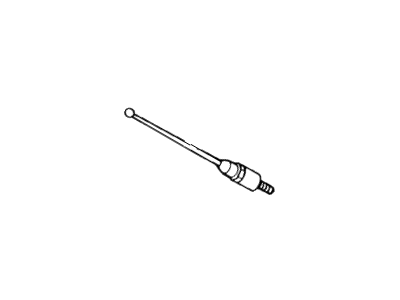
Mercury E6VY-18A886-A Rod Assy - Replacement - Aerial

1983-1988 Mercury Cougar E6VY18A886A

Customer Questions & Expert Answers (4)
E6VY-18A886-A Ford Rod Assy - Replacement - Aerial Illustration 1 of 1
  • Part Description
    Rod Assy - Replacement - Aerial
  • Manufacturer
    Ford
  • Manufacturer's Notes
    This part is discontinued.
Make sure this part fits
  • Related Parts
  • Specifications
  • Fitment
  • Q&A
  • Product Specifications

    BrandGenuine Mercury
    Manufacturer Part NumberE6VY-18A886-A, E6VY18A886A
    Part DescriptionRod Assy - Replacement - Aerial
    Other NamesAntenna Mast
    Item Dimensions10.4 x 5.9 x 3.9 inches
    Item Weight0.90 Pounds
    ConditionNew
    Fitment TypeDirect Replacement
    ManufacturerFord
    SKUE6VY-18A886-A
    WarrantyThis genuine Ford part is guaranteed by Ford's factory warranty.
    Shipping & ReturnShipping Policy Return Policy
    Warning: California's Proposition 65
  • Vehicle Fitment

    Year Make Model Engine Important vehicle option details
    1983-1988 Mercury Cougar4 Cyl 2.3L, 6 Cyl 3.8L, 8 Cyl 5.0L3AT C5, 4AT AOD, 5MT
  • Customer Questions & Expert Answers

    Q:
    I would like to know is this part gonna fit with my car Posted by FordPartsGiant Specialist
    A:
    You can Select Your Vehicle to check if E6VY-18A886-A fits your vehicle.
    Posted by FordPartsGiant Specialist
    Q:
    How to test and replace the antenna on Lincoln Town Car? Posted by Customer
    A:
    On 1997 and later models, the antenna is a grid bonded to the rear window and cannot be replaced conventionally. To check the antenna, perform a resistance check between the cable and mast. If correct, the antenna is okay; otherwise, inspect the cable and base. Replace the cable or antenna if the resistance exceeds five ohms. Disconnect the cable from the negative battery terminal and remove the antenna for replacement. For a rear-mounted antenna, remove the trim panel, unscrew the mounting screws, and disconnect electrical connectors to remove the antenna assembly. To replace the antenna mast and drive cable, remove the retaining nut, pull out the mast, and replace the cable. Verify proper operation by activating the antenna through radio on/off cycles.
    Posted by FordPartsGiant Specialist
    Q:
    How to test and replace the antenna on Lincoln Mark VII? Posted by Customer
    A:
    To test antenna cables and mast on vehicles made before 1996, disconnect the cable from the radio, put your ohmmeter on it, and measure resistance; readings should be below five ohms. Your antenna is working when the reading shows it's correct. Look at the antenna cable and mast base when reading is wrong. First, measure the resistance between the antenna cable and the radio, then between the cable and the antenna. Resistance under five ohms on each connection is normal; replacing them if they don't measure correctly. Pull the antenna physically from the car to see if the measurement between the base and its center port is under five ohms; this means the antenna is working. Higher readings mean you need to replace it. Disconnect the cable from the negative battery first. Then to remove the front-mounted antenna, lower it down and take away the rear screws behind the right front fender to get to the antenna bolt below. Drop the antenna through the fender opening after removing the top nut from the stanchion and reinstall it by going backwards through this process. To reach the rear antenna, lift the car, then take out the lower antenna bolt after removing the trunk trim panel. Unscrew the antenna cap from the radio, undo the mounting screws, disconnect power connections, lift the antenna down into the trunk of the vehicle, while reversing these steps for correct installation. When the plastic antenna drive cable gets damaged or the mast becomes bent, you must replace both the cable and the mast which stays where it is attached to the motor. Take off the retaining nut. Gently pull the mast out of the motor until the drive cable has room to come off. Record how the drive teeth move as you pull. Detach the old mast with a hacksaw, slip the nut and tube away, insert the new cable into the motor drive, keep running the motor and holding the cable till 12 inches go inside, lower down the new tube and nut, secure the nut firmly, and verify operation by switching on and off the radio antenna a few times.

    Posted by FordPartsGiant Specialist
    Q:
    How to test and replace the antenna on Lincoln Continental? Posted by Customer
    A:
    To test antenna cables and mast on vehicles made before 1996, disconnect the cable from the radio, put your ohmmeter on it, and measure resistance; readings should be below five ohms. Your antenna is working when the reading shows it's correct. Look at the antenna cable and mast base when reading is wrong. First, measure the resistance between the antenna cable and the radio, then between the cable and the antenna. Resistance under five ohms on each connection is normal; replacing them if they don't measure correctly. Pull the antenna physically from the car to see if the measurement between the base and its center port is under five ohms; this means the antenna is working. Higher readings mean you need to replace it. Disconnect the cable from the negative battery first. Then to remove the front-mounted antenna, lower it down and take away the rear screws behind the right front fender to get to the antenna bolt below. Drop the antenna through the fender opening after removing the top nut from the stanchion and reinstall it by going backwards through this process. To reach the rear antenna, lift the car, then take out the lower antenna bolt after removing the trunk trim panel. Unscrew the antenna cap from the radio, undo the mounting screws, disconnect power connections, lift the antenna down into the trunk of the vehicle, while reversing these steps for correct installation. When the plastic antenna drive cable gets damaged or the mast becomes bent, you must replace both the cable and the mast which stays where it is attached to the motor. Take off the retaining nut. Gently pull the mast out of the motor until the drive cable has room to come off. Record how the drive teeth move as you pull. Detach the old mast with a hacksaw, slip the nut and tube away, insert the new cable into the motor drive, keep running the motor and holding the cable till 12 inches go inside, lower down the new tube and nut, secure the nut firmly, and verify operation by switching on and off the radio antenna a few times.

    Posted by FordPartsGiant Specialist
    If you have any questions about this product, please don't hesitate to ask us. We will be happy to help you!

Genuine Ford Part E6VY-18A886-A, the Right Choice

To ensure reliability, purchase part # E6VY-18A886-A Rod Assy - Replacement - Aerial. It is also called Antenna. OEM parts are of high quality and known for their longevity. This is because they are built to the Ford standards which are relatively high and undergo rigorous quality control testing. This part fits specific Mercury Cougar models.

FordPartsGiant.com is a leading supplier of genuine components and accessories such as E6VY18A886A Rod Assy - Replacement - Aerial. Looking to purchase quality low-cost OEM Ford parts? You have just found the right place. For detailed Mercury parts information, click here.

Why choose Ford Parts Giant

  • Dedicated Service

    Your complete satisfaction is our #1 goal

  • Lowest Prices

    Best deals on genuine OE parts from dealerships

  • Fast Delivery

    Orders are processed and delivered promptly