Make sure this part fits

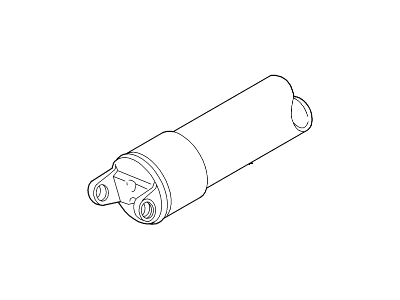
Ford 2L7Z-4602-BC Drive Shaft Assembly

2003-2004 Lincoln Navigator 2L7Z4602BC

Customer Questions & Expert Answers (2)
2L7Z-4602-BC Ford Drive Shaft Assembly Illustration 1 of 1
  • Part Description
    Shaft Assembly - Drive
  • Manufacturer
    Ford
  • Manufacturer's Notes
    This part is discontinued.
Make sure this part fits
  • Related Parts
  • Specifications
  • Fitment
  • Q&A
  • Product Specifications

    BrandGenuine Ford
    Manufacturer Part Number2L7Z-4602-BC, 2L7Z4602BC
    Part DescriptionShaft Assembly - Drive
    Item Dimensions36.1 x 5.0 x 5.0 inches
    ConditionNew
    Fitment TypeDirect Replacement
    ManufacturerFord
    SKU2L7Z-4602-BC
    WarrantyThis genuine Ford part is guaranteed by Ford's factory warranty.
    Shipping & ReturnShipping Policy Return Policy
    Warning: California's Proposition 65
  • Vehicle Fitment

    Year Make Model Engine Important vehicle option details
    2003-2004 Lincoln Navigator8 Cyl 5.4L, 8 Cyl 5.4L DOHC EFI4-Speed Automatic Transmission E4OD(4R100), 6-Speed Automatic Transmission (6R80), 6-Speed Automatic Transmission ZF 6HP26 Steptronic, Four-Wheel Drive (Part Time) (Left Hand Drive), Left Hand Drive
  • Customer Questions & Expert Answers

    Q:
    I am wondering if this is the exact part that fits in Posted by FordPartsGiant Specialist
    A:
    You can Select Your Vehicle to check if 2L7Z-4602-BC fits your vehicle.
    Posted by FordPartsGiant Specialist
    Installation and Repair Tips
    Q:
    How to remove and install the Lincoln Navigator's drive shaft? Posted by Customer
    A:
    When the vehicle has air suspension, switch it to the off mode. Set the car on jackstands, safely supporting it as you lift it. Unshift into Neutral and take off the handbrake while holding back the wheels with blocks. Before removing the driveshaft, you must carefully mark how it connects to the differential pinion flange. This marking enables us to realign the driveshaft's balance with the existing pinion flange when we reinstall it later. We use a scribe, hammer and punch, or paint to make the marks. Take out the bolts holding the rear universal joint. To keep the driveshaft from spinning, stick a screwdriver through its hole before loosening all 4 bolts connecting the U-joint to the pinion flange. When the bolts are difficult to reach, spin the drive shaft (or wheels) to find the best angle. Before you take out the driveshaft on models with two-piece driveshafts, take away the screws holding the center bearing support brackets. Pull down the back of the driveshaft, scoop out the slip yoke from the front end, and take off the entire driveshaft unit. Before taking out the driveshaft, slip a plastic bag over the transmission or transfer case extension housing, secure it with a rubber band, and keep it this way to stop fluid from dripping and protect from dirt. When you take out the driveshaft, stop and check both the extension housing seal and the differential pinion seal. If they need replacing, do that now. When you have a split driveshaft, take time to look for any issues affecting your center bearing. First, put the center bearing and bracket back in place on your two-piece driveshaft before fixing the two ends together again. When you took off the old extension housing seal, it's time to install a brand new one. Clean both the transmission and transfer case extension housing parts with the plastic bag removed. Place the drive shaft's front slip yoke carefully onto the end of the transmission or transfer case output shaft, making sure you avoid damaging the shaft seal's rim. Just put the rear end of the driveshaft and the center bearing assembly into place, fasten the support bracket bolts, and make them tight. Position the rear of the driveshaft overtop the vehicle alignment marks. When the marks don't match, spin the rear wheels until everything lines up with the pinion flange. Lower the car after you've checked and kneaded all bolts. Take out your jackstands. Bring back the air suspension system working if your vehicle has it.

    Posted by FordPartsGiant Specialist
    See Complete Installation and Repair Tips

Genuine Ford Part 2L7Z-4602-BC, the Right Choice

To ensure reliability, purchase part # 2L7Z-4602-BC Drive Shaft Assembly. It is also called Drive Shaft. OEM parts are of high quality and known for their longevity. This is because they are built to the Ford standards which are relatively high and undergo rigorous quality control testing. This part fits specific Lincoln Navigator models.

FordPartsGiant.com is a leading supplier of genuine components and accessories such as 2L7Z4602BC Drive Shaft Assembly. Looking to purchase quality low-cost OEM Ford parts? You have just found the right place. For detailed Lincoln parts information, click here.

Why choose Ford Parts Giant

  • Dedicated Service

    Your complete satisfaction is our #1 goal

  • Lowest Prices

    Best deals on genuine OE parts from dealerships

  • Fast Delivery

    Orders are processed and delivered promptly